APIリファレンス
このページは PageTurner AI で翻訳されました(ベータ版)。プロジェクト公式の承認はありません。 エラーを見つけましたか? 問題を報告 →
- JavaScript
- React
container
type: string | HTMLElement| required
The container for the DocSearch search box. You can either pass a CSS selector or an Element. If there are several containers matching the selector, DocSearch picks up the first one.
environment
type: typeof window|default: window| optional
The environment in which your application is running.
This is useful if you’re using DocSearch in a different context than window.
appId
type: string| 必須
AlgoliaアプリケーションIDです。
apiKey
type: string| 必須
Algolia Search APIキーです。
indices
type: Array<string | DocSearchIndex>
キーワード検索に使用するインデックスとそのオプションのsearchParametersのリストです。
リスト内の順序は重要です。検索結果はindicesの順序に基づいて表示されます。
indexNameは非推奨となっていますが、indicesかindexNameのどちらかを渡す必要があります。両方とも渡さない場合、Errorがスローされます。
- JavaScript
- React
docsearch({
  // ...
  indices: ['YOUR_ALGOLIA_INDEX'],
  // ...
});
in case you want to use custom searchParameters for the index
docsearch({
  // ...
  indices: [
    {
      name: 'YOUR_ALGOLIA_INDEX',
      searchParameters: {
        facetFilters: ['language:en'],
        // ...
      },
    },
  ],
  // ...
});
<DocSearch
  // ...
  indices={['YOUR_ALGOLIA_INDEX']}
  // ...
/>
in case you want to use custom searchParameters for the index
<DocSearch
  // ...
  indices={[
    {
      name: 'YOUR_ALGOLIA_INDEX',
      searchParameters: {
        facetFilters: ['language:en'],
        // ...
      },
    },
  ]}
  // ...
/>
indexName
type: string| 非推奨
indexNameは現在非推奨の予定です。新しい推奨プロパティはindicesです。
Algoliaインデックス名です。
indexNameは非推奨となっていますが、indicesかindexNameのどちらかを渡す必要があります。両方とも渡さない場合、Errorがスローされます。
placeholder
type: string|default: "Search docs"| オプション
The placeholder of the input of the DocSearch pop-up modal. Note: If you add a placeholder, it will replace the dynamic placeholder based on askAi. It would be better to edit translations instead.
askAi
type: AskAiObject|string| オプション
Algolia Assistant IDです。
- JavaScript
- React
docsearch({
  // ...
  askAi: 'YOUR_ALGOLIA_ASSISTANT_ID',
  // ...
});
or if you want to use different credentials for askAi and add search parameters
docsearch({
  // ...
  askAi: {
    indexName: 'ANOTHER_INDEX_NAME',
    apiKey: 'ANOTHER_SEARCH_API_KEY',
    appId: 'ANOTHER_APP_ID',
    assistantId: 'YOUR_ALGOLIA_ASSISTANT_ID',
    searchParameters: {
      // Filtering parameters
      facetFilters: ['language:en', 'version:latest'],
      filters: 'type:content AND language:en',

      // Content control parameters
      attributesToRetrieve: ['title', 'content', 'url'],
      restrictSearchableAttributes: ['title', 'content'],

      // Deduplication
      distinct: true,
    },

    // Enables/disables showing suggested questions on Ask AI's new conversation screen
    // NOTE: Only available with version >= 4.3
    suggestedQuestions: true,
  },
  // ...
});
<DocSearch
  // ...
  askAi="YOUR_ALGOLIA_ASSISTANT_ID"
/>
in case you want to use different credentials for askAi
<DocSearch
  // ...
  askAi={{
    indexName: 'ANOTHER_INDEX_NAME',
    apiKey: 'ANOTHER_SEARCH_API_KEY',
    appId: 'ANOTHER_APP_ID',
    assistantId: 'YOUR_ALGOLIA_ASSISTANT_ID',
    searchParameters: {
      // Filtering parameters
      facetFilters: ['language:en', 'version:latest'],
      filters: 'type:content AND language:en',

      // Content control parameters
      attributesToRetrieve: ['title', 'content', 'url'],
      restrictSearchableAttributes: ['title', 'content'],

      // Deduplication
      distinct: true,
    },

    // Enables/disables showing suggested questions on Ask AI's new conversation screen
    // NOTE: Only available with version >= 4.3
    suggestedQuestions: true,
  }}
/>
- フィルタリング:
facetFilters: ['type:content']- 言語、バージョン、コンテンツタイプでフィルタ - 複合フィルタリング:
filters: 'type:content AND language:en'- 複雑なフィルタリングルールを適用 - コンテンツ制御:
attributesToRetrieve: ['title', 'content', 'url']- 取得する属性を制御 - 検索範囲:
restrictSearchableAttributes: ['title', 'content']- 検索を特定フィールドに制限 - 重複排除:
distinct: true- 重複結果を排除 (boolean | number | string)
これらのパラメータは、APIをシンプルに保ちつつAsk AIの基本機能を提供します。
askAi.agentStudio
type: boolean| オプション | 実験的
askAi.agentStudio は現在実験的プロパティです。安定版リリース 5.0.0 を目標に開発中です。
askAi.agentStudio が true の場合、Ask AIチャットはAsk AIバックエンドの代わりにAlgoliaのAgent Studioをチャットバックエンドとして使用します。詳細はAlgolia Agent Studioドキュメントをご覧ください。
docsearch({
  // ...
  askAi: {
    assistantId: 'YOUR_ALGOLIA_ASSISTANT_ID',
    agentStudio: true,
    searchParameters: {
      YOUR_INDEX_NAME: {
        filters: 'type:content AND language:en',
        attributesToRetrieve: ['title', 'content', 'url'],
        restrictSearchableAttributes: ['title', 'content'],
        distinct: 'url',
      },
    },
  },
});
- 標準Ask AI (
agentStudio未指定またはfalse):searchParametersはフラットオブジェクトでfacetFilters,filters,attributesToRetrieve,restrictSearchableAttributes,distinctをサポート - Agent Studio (
agentStudio: true):searchParametersはインデックス名をキーとするオブジェクトでfilters,attributesToRetrieve,restrictSearchableAttributes,distinctをサポート
searchParameters
type: SearchParameters| 任意 | 非推奨
searchParametersは現在非推奨の予定です。新しい推奨プロパティはindicesです。
transformItems
type: function|default: items => items| オプション
検索レスポンスからアイテムを受け取り、表示前に呼び出されます。元の配列と同じ形式の新しい配列を返す必要があります。アイテムを変換、削除、または並べ替えるためにマッピングする際に有用です。
- JavaScript
- React
docsearch({
  // ...
  transformItems(items) {
    return items.map((item) => ({
      ...item,
      content: item.content.toUpperCase(),
    }));
  },
});
<DocSearch
  // ...
  transformItems={(items) => {
    return items.map((item) => ({
      ...item,
      content: item.content.toUpperCase(),
    }));
  }}
/>
hitComponent
type: ({ hit, children }, { html }) => JSX.Element | string | Function|default: Hit| 任意
各検索結果アイテムを表示するコンポーネントです。以下のテンプレートパターンをサポートしています:
-
htmlヘルパーを使ったHTML文字列(JS CDN利用時推奨):
({ hit, children }, { html }) => html... -
JSXテンプレート(React/Preact用):
({ hit, children }) => <div>...</div> -
関数ベーステンプレート:
(props) => string | JSX.Element | Function
検索結果の全データを含むhitオブジェクトと、デフォルトでレンダリングされる内容であるchildrenにアクセスできます。
デフォルト実装を参照してください。
- JavaScript
- React
docsearch({
  // ...
  hitComponent({ hit, children }, { html }) {
    // Using HTML strings with html helper
    return html`
      <a href="${hit.url}" class="custom-hit-class">
        <div class="hit-icon">🔍</div>
        <div class="hit-content">${children}</div>
      </a>
    `;
  },
});
<DocSearch
  // ...
  hitComponent={({ hit, children }) => {
    // Using JSX templates
    return (
      <a href={hit.url} className="custom-hit-class">
        <div className="hit-icon">🔍</div>
        <div className="hit-content">{children}</div>
      </a>
    );
  }}
/>
transformSearchClient
type: function|default: DocSearchTransformClient => DocSearchTransformClient| オプション
Algolia Search Clientの変換に有用です。例: 検索クエリのデバウンス処理
disableUserPersonalization
type: boolean|default: false| 任意
最近の検索履歴やお気に入りをローカルストレージに保存する機能を無効化します。
initialQuery
type: string| 任意
検索入力フィールドの初期クエリ文字列。
navigator
type: Navigator| 任意
リンク開封時のユーザーリダイレクトを制御するAlgolia AutocompleteのNavigator API実装。
詳細はNavigator APIドキュメントを参照してください。
translations
type: Partial<DocSearchTranslations>|default: docSearchTranslations| 任意
DocSearchボタンやモーダルコンポーネント内のテキスト/ARIAラベルの翻訳をカスタマイズできます。
docSearchTranslations
const translations: DocSearchTranslations = {
  button: {
    buttonText: 'Search',
    buttonAriaLabel: 'Search',
  },
  modal: {
    searchBox: {
      clearButtonTitle: 'Clear',
      clearButtonAriaLabel: 'Clear the query',
      closeButtonText: 'Close',
      closeButtonAriaLabel: 'Close',
      placeholderText: undefined, // fallback: 'Search docs' or 'Search docs or ask AI a question'
      placeholderTextAskAi: undefined, // fallback: 'Ask another question...'
      placeholderTextAskAiStreaming: 'Answering...',
      // can only be one of the following
      // https://developer.mozilla.org/en-US/docs/Web/HTML/Reference/Global_attributes/enterkeyhint#value
      enterKeyHint: 'search',
      enterKeyHintAskAi: 'enter',
      searchInputLabel: 'Search',
      backToKeywordSearchButtonText: 'Back to keyword search',
      backToKeywordSearchButtonAriaLabel: 'Back to keyword search',
      newConversationPlaceholder: 'Ask a question',
      conversationHistoryTitle: 'My conversation history',
      startNewConversationText: 'Start a new conversation',
      viewConversationHistoryText: 'Conversation history'
    },
    startScreen: {
      recentSearchesTitle: 'Recent',
      noRecentSearchesText: 'No recent searches',
      saveRecentSearchButtonTitle: 'Save this search',
      removeRecentSearchButtonTitle: 'Remove this search from history',
      favoriteSearchesTitle: 'Favorite',
      removeFavoriteSearchButtonTitle: 'Remove this search from favorites',
      recentConversationsTitle: 'Recent conversations',
      removeRecentConversationButtonTitle:
        'Remove this conversation from history',
    },
    errorScreen: {
      titleText: 'Unable to fetch results',
      helpText: 'You might want to check your network connection.',
    },
    noResultsScreen: {
      noResultsText: 'No results found for',
      suggestedQueryText: 'Try searching for',
      reportMissingResultsText: 'Believe this query should return results?',
      reportMissingResultsLinkText: 'Let us know.',
    },
    resultsScreen: {
      askAiPlaceholder: 'Ask AI: ',
      noResultsAskAiPlaceholder: 'Didn't find it in the docs? Ask AI to help: ',
    },
    askAiScreen: {
      disclaimerText:
        'Answers are generated with AI which can make mistakes. Verify responses.',
      relatedSourcesText: 'Related sources',
      thinkingText: 'Thinking...',
      copyButtonText: 'Copy',
      copyButtonCopiedText: 'Copied!',
      copyButtonTitle: 'Copy',
      likeButtonTitle: 'Like',
      dislikeButtonTitle: 'Dislike',
      thanksForFeedbackText: 'Thanks for your feedback!',
      preToolCallText: 'Searching...',
      duringToolCallText: 'Searching for ',
      afterToolCallText: 'Searched for',
      // If provided, these override the default rendering of aggregated tool calls:
      aggregatedToolCallNode: undefined, // (queries: string[], onSearchQueryClick: (query: string) => void) => React.ReactNode
      aggregatedToolCallText: undefined, // (queries: string[]) => { before?: string; separator?: string; lastSeparator?: string; after?: string }
      // Text to show when user has stopped streaming a message
      stoppedStreamingText: 'You stopped this response',
    },
    footer: {
      selectText: 'Select',
      submitQuestionText: 'Submit question',
      selectKeyAriaLabel: 'Enter key',
      navigateText: 'Navigate',
      navigateUpKeyAriaLabel: 'Arrow up',
      navigateDownKeyAriaLabel: 'Arrow down',
      closeText: 'Close',
      backToSearchText: 'Back to search',
      closeKeyAriaLabel: 'Escape key',
      poweredByText: 'Powered by',
    },
    newConversation: {
      newConversationTitle: 'How can I help you today?',
      newConversationDescription: 'I search through your documentation to help you find setup guides, feature details and troubleshooting tips, fast.'
    }
  },
};
getMissingResultsUrl
type: ({ query: string }) => string| 任意
ドキュメントリポジトリのURLを返す関数。
- JavaScript
- React
docsearch({
  // ...
  getMissingResultsUrl({ query }) {
    return `https://github.com/algolia/docsearch/issues/new?title=${query}`;
  },
});
<DocSearch
  // ...
  getMissingResultsUrl={({ query }) => {
    return `https://github.com/algolia/docsearch/issues/new?title=${query}`;
  }}
/>
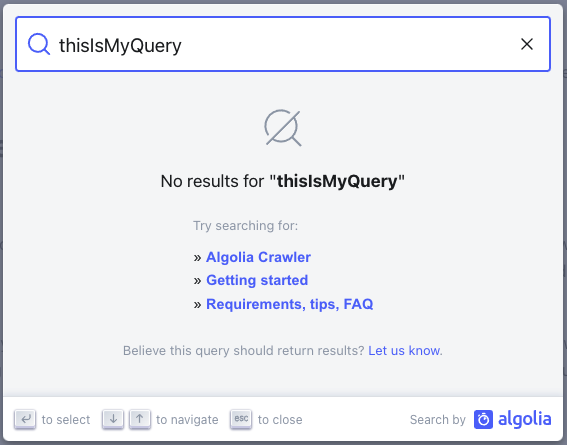
設定時、検索結果が0件の場合に指定URLをラップした情報メッセージが表示されます。デフォルトテキストはtranslationsプロパティで変更可能。
keyboardShortcuts
type: KeyboardShortcuts| 任意
検索モーダルを起動するキーボードショートカット設定。
デフォルト動作:
-
Ctrl/Cmd+K- 検索モーダルの開閉 -
/- 検索モーダルを開く(閉じない)
インターフェース:
interface KeyboardShortcuts {
  'Ctrl/Cmd+K'?: boolean; // default: true
  '/'?: boolean; // default: true
}
- JavaScript
- React
// Default - all shortcuts enabled
docsearch({
  // ...
});

// Disable slash shortcut
docsearch({
  // ...
  keyboardShortcuts: { '/': false },
});

// Disable Ctrl/Cmd+K shortcut (also hides button hint)
docsearch({
  // ...
  keyboardShortcuts: { 'Ctrl/Cmd+K': false },
});

// Disable all keyboard shortcuts
docsearch({
  // ...
  keyboardShortcuts: { 'Ctrl/Cmd+K': false, '/': false },
});
{
  /* Default - all shortcuts enabled */
}
<DocSearch
// ...
/>;

{
  /* Disable slash shortcut */
}
<DocSearch
  // ...
  keyboardShortcuts={{ '/': false }}
/>;

{
  /* Disable Ctrl/Cmd+K shortcut (also hides button hint) */
}
<DocSearch
  // ...
  keyboardShortcuts={{ 'Ctrl/Cmd+K': false }}
/>;

{
  /* Disable all keyboard shortcuts */
}
<DocSearch
  // ...
  keyboardShortcuts={{ 'Ctrl/Cmd+K': false, '/': false }}
/>;
- Ctrl/Cmd+K: モーダルを開閉するトグルショートカット
- /: モーダルを開くのみの文字ショートカット(検索入力の干渉を防止)
- Escape: 設定に関係なく常にモーダルを閉じる
resultsFooterComponent
type: ({ state }, { html }) => JSX.Element | string | Function| 任意
検索結果の下部に表示するコンポーネントです。以下のテンプレートパターンをサポートしています:
-
htmlヘルパーを使ったHTML文字列(JS CDN利用時推奨):
({ state }, { html }) => html... -
JSXテンプレート(React/Preact用):
({ state }) => <div>...</div> -
関数ベーステンプレート:
(props) => string | JSX.Element | Function
現在の状態にアクセスでき、返されたヒット数やクエリなどを取得できます。
- JavaScript
- React
docsearch({
  // ...
  resultsFooterComponent({ state }, { html }) {
    // Using HTML strings with html helper
    return html`
      <div class="DocSearch-HitsFooter">
        <a href="https://docsearch.algolia.com/apply" target="_blank">
          See all ${state.context.nbHits} results
        </a>
      </div>
    `;
  },
});
<DocSearch
  // ...
  resultsFooterComponent={({ state }) => {
    // Using JSX templates
    return (
      <div className="DocSearch-HitsFooter">
        <a href="https://docsearch.algolia.com/apply" target="_blank">
          See all {state.context.nbHits} results
        </a>
      </div>
    );
  }}
/>
maxResultsPerGroup
type: number| オプション
検索グループごとに表示する結果の最大数。デフォルトは5です。
- JavaScript
docsearch({
  // ...
  maxResultsPerGroup: 7,
});
recentSearchesLimit
type: number|default: 7| 任意
ユーザー用に保存される最近の検索履歴の最大数。デフォルトは7です。
- JavaScript
- React
docsearch({
  // ...
  recentSearchesLimit: 12,
  // ...
});
<DocSearch
  // ...
  recentSearchesLimit={12}
  // ...
/>
recentSearchesWithFavoritesLimit
type: number|default: 4| 任意
ユーザーがお気に入り検索を設定している場合に保存される最近の検索履歴の最大数。デフォルトは4です。
- JavaScript
- React
docsearch({
  // ...
  recentSearchesWithFavoritesLimit: 5,
  // ...
});
<DocSearch
  // ...
  recentSearchesWithFavoritesLimit={5}
  // ...
/>
portalContainer (React専用)
type: Element | DocumentFragment|default: document.body| 任意
DocSearchモーダルがポータルされる要素。シャドウルート内、特定のレイアウトコンテナ、モーダルマネージャーで作業する場合など、オーバーレイをカスタムDOMノードにレンダリングする必要がある場合に使用します。省略時はdocument.bodyにポータルされます。
このプロパティは@docsearch/reactのみで利用可能です。@docsearch/js を使用している場合は、代わりにcontainerオプションを使用してください。そこに渡す値は、検索ボタンのマウントポイントであると同時にモーダルのポータル先にもなります。
- React
- JavaScript
// assume you have a dedicated modal root in your html
<div id="modal-root" />;

const portalEl = document.getElementById('modal-root');

<DocSearch
  appId="YOUR_APP_ID"
  apiKey="YOUR_SEARCH_API_KEY"
  indexName="YOUR_INDEX_NAME"
  // render the modal inside #modal-root instead of document.body
  portalContainer={portalEl}
/>;
docsearch({
  // the element that will **contain the button** and **host the modal portal**
  container: '#modal-root',
  appId: 'YOUR_APP_ID',
  apiKey: 'YOUR_SEARCH_API_KEY',
  indexName: 'YOUR_INDEX_NAME',
});