APIリファレンス
このページは PageTurner AI で翻訳されました(ベータ版)。プロジェクト公式の承認はありません。 エラーを見つけましたか? 問題を報告 →
以下の内容は**DocSearch v3**向けです。 **DocSearch v2をご利用の場合は、レガシー**ドキュメントを参照してください。
DocSearch v4をお探しの場合は、ドキュメントは**こちら**からご覧いただけます。
- JavaScript
- React
container
type: string | HTMLElement| required
The container for the DocSearch search box. You can either pass a CSS selector or an Element. If there are several containers matching the selector, DocSearch picks up the first one.
environment
type: typeof window|default: window| optional
The environment in which your application is running.
This is useful if you’re using DocSearch in a different context than window.
appId
type: string| 必須
AlgoliaアプリケーションIDです。
apiKey
type: string| 必須
Algolia Search APIキーです。
indexName
type: string| 必須
Algoliaインデックス名です。
placeholder
type: string|default: "Search docs"| オプション
DocSearchポップアップモーダルの入力フィールドのプレースホルダーです。
searchParameters
type: SearchParameters| 任意
transformItems
type: function|default: items => items| オプション
検索レスポンスからアイテムを受け取り、表示前に呼び出されます。元の配列と同じ形式の新しい配列を返す必要があります。アイテムを変換、削除、または並べ替えるためにマッピングする際に有用です。
- JavaScript
- React
docsearch({
  // ...
  transformItems(items) {
    return items.map((item) => ({
      ...item,
      content: item.content.toUpperCase(),
    }));
  },
});
<DocSearch
  // ...
  transformItems={(items) => {
    return items.map((item) => ({
      ...item,
      content: item.content.toUpperCase(),
    }));
  }}
/>
hitComponent
type: ({ hit, children }) => JSX.Element|default: Hit| オプション
各アイテムを表示するコンポーネントです。
デフォルト実装を参照してください。
transformSearchClient
type: function|default: DocSearchTransformClient => DocSearchTransformClient| オプション
Algolia Search Clientの変換に有用です。例: 検索クエリのデバウンス処理
disableUserPersonalization
type: boolean|default: false| 任意
最近の検索履歴やお気に入りをローカルストレージに保存する機能を無効化します。
initialQuery
type: string| 任意
検索入力フィールドの初期クエリ文字列。
navigator
type: Navigator| 任意
リンク開封時のユーザーリダイレクトを制御するAlgolia AutocompleteのNavigator API実装。
詳細はNavigator APIドキュメントを参照してください。
translations
type: Partial<DocSearchTranslations>|default: docSearchTranslations| 任意
DocSearchボタンやモーダルコンポーネント内のテキスト/ARIAラベルの翻訳をカスタマイズできます。
docSearchTranslations
const translations: DocSearchTranslations = {
  button: {
    buttonText: 'Search',
    buttonAriaLabel: 'Search',
  },
  modal: {
    searchBox: {
      resetButtonTitle: 'Clear the query',
      resetButtonAriaLabel: 'Clear the query',
      cancelButtonText: 'Cancel',
      cancelButtonAriaLabel: 'Cancel',
      searchInputLabel: 'Search',
    },
    startScreen: {
      recentSearchesTitle: 'Recent',
      noRecentSearchesText: 'No recent searches',
      saveRecentSearchButtonTitle: 'Save this search',
      removeRecentSearchButtonTitle: 'Remove this search from history',
      favoriteSearchesTitle: 'Favorite',
      removeFavoriteSearchButtonTitle: 'Remove this search from favorites',
    },
    errorScreen: {
      titleText: 'Unable to fetch results',
      helpText: 'You might want to check your network connection.',
    },
    footer: {
      selectText: 'Select',
      selectKeyAriaLabel: 'Enter key',
      navigateText: 'Navigate',
      navigateUpKeyAriaLabel: 'Arrow up',
      navigateDownKeyAriaLabel: 'Arrow down',
      closeText: 'Close',
      closeKeyAriaLabel: 'Escape key',
      poweredByText: 'Powered by',
    },
    noResultsScreen: {
      noResultsText: 'No results for',
      suggestedQueryText: 'Try searching for',
      reportMissingResultsText: 'Believe this query should return results?',
      reportMissingResultsLinkText: 'Let us know.',
    },
  },
};
getMissingResultsUrl
type: ({ query: string }) => string| 任意
ドキュメントリポジトリのURLを返す関数。
- JavaScript
- React
docsearch({
  // ...
  getMissingResultsUrl({ query }) {
    return `https://github.com/algolia/docsearch/issues/new?title=${query}`;
  },
});
<DocSearch
  // ...
  getMissingResultsUrl={({ query }) => {
    return `https://github.com/algolia/docsearch/issues/new?title=${query}`;
  }}
/>
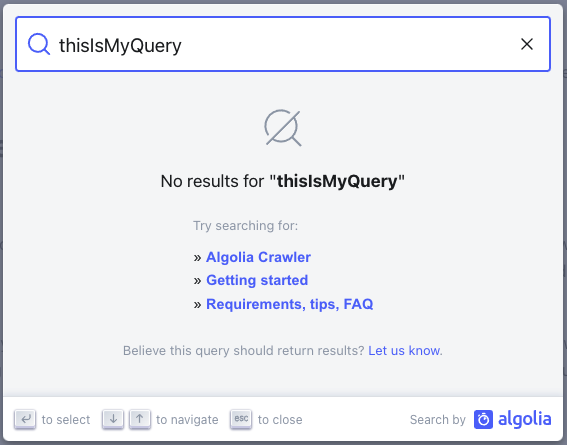
設定時、検索結果が0件の場合に指定URLをラップした情報メッセージが表示されます。デフォルトテキストはtranslationsプロパティで変更可能。
resultsFooterComponent
type: ({ state }) => JSX.Element| 任意
検索結果の下に表示するコンポーネントです。
現在の状態にアクセスでき、返されたヒット数やクエリなどを取得できます。
JSXを使用しない動作例はこのサンドボックスで確認できます。
- JavaScript
- React
docsearch({
  // ...
  resultsFooterComponent({ state }) {
    return {
      // The HTML `tag`
      type: 'a',
      ref: undefined,
      constructor: undefined,
      key: state.query,
      // Its props
      props: {
        href: 'https://docsearch.algolia.com/apply',
        target: '_blank',
        onClick: (event) => {
          console.log(event);
        },
        // Raw text rendered in the HTML element
        children: `${state.context.nbHits} hits found!`,
      },
      __v: null,
    };
  },
});
<DocSearch
  // ...
  resultsFooterComponent={({ state }) => {
    return <h1>{state.context.nbHits} hits found</h1>;
  }}
/>
maxResultsPerGroup
type: number| オプション
検索グループごとに表示する結果の最大数。デフォルトは5です。
- JavaScript
docsearch({
  // ...
  maxResultsPerGroup: 7,
});
theme
type: DocSearchTheme|default: "light"| 任意
DocSearchのテーマ。light(ライト)またはdark(ダーク)を指定できます。
- JavaScript
docsearch({
  // ...
  theme: 'light',
});