API 参考
本页面由 PageTurner AI 翻译(测试版)。未经项目官方认可。 发现错误? 报告问题 →
以下内容适用于 DocSearch v3。 若您正在使用 DocSearch v2,请查阅 旧版 文档。
如需了解 DocSearch v4,请访问 此文档。
- JavaScript
- React
container
type: string | HTMLElement| required
The container for the DocSearch search box. You can either pass a CSS selector or an Element. If there are several containers matching the selector, DocSearch picks up the first one.
environment
type: typeof window|default: window| optional
The environment in which your application is running.
This is useful if you’re using DocSearch in a different context than window.
appId
type: string| 必填
您的 Algolia 应用 ID。
apiKey
type: string| 必填
您的 Algolia 搜索 API 密钥。
indexName
type: string| 必填
您的 Algolia 索引名称。
placeholder
type: string|default: "Search docs"| 可选
DocSearch 弹窗输入框中的占位符文本。
searchParameters
type: SearchParameters| 可选
transformItems
type: function|default: items => items| 可选
接收来自搜索响应的条目,并在显示前进行处理。应返回与原始数组结构相同的新数组,适用于对条目进行转换、删除或重新排序。
- JavaScript
- React
docsearch({
  // ...
  transformItems(items) {
    return items.map((item) => ({
      ...item,
      content: item.content.toUpperCase(),
    }));
  },
});
<DocSearch
  // ...
  transformItems={(items) => {
    return items.map((item) => ({
      ...item,
      content: item.content.toUpperCase(),
    }));
  }}
/>
hitComponent
type: ({ hit, children }) => JSX.Element|default: Hit| 可选
用于展示每个条目的组件。
参阅默认实现。
transformSearchClient
type: function|default: DocSearchTransformClient => DocSearchTransformClient| 可选
用于转换 Algolia 搜索客户端,例如实现 搜索查询防抖
disableUserPersonalization
type: boolean|default: false| 可选
禁用将最近搜索和收藏保存到本地存储的功能
initialQuery
type: string| 可选
搜索输入框的初始查询内容
navigator
type: Navigator| 可选
Algolia Autocomplete 导航器 API 的实现,用于在打开链接时重定向用户
详见 导航器 API 文档
translations
type: Partial<DocSearchTranslations>|default: docSearchTranslations| 可选
允许翻译 DocSearch 按钮或弹窗组件中的任意原始文本和 aria 标签
docSearchTranslations
const translations: DocSearchTranslations = {
  button: {
    buttonText: 'Search',
    buttonAriaLabel: 'Search',
  },
  modal: {
    searchBox: {
      resetButtonTitle: 'Clear the query',
      resetButtonAriaLabel: 'Clear the query',
      cancelButtonText: 'Cancel',
      cancelButtonAriaLabel: 'Cancel',
      searchInputLabel: 'Search',
    },
    startScreen: {
      recentSearchesTitle: 'Recent',
      noRecentSearchesText: 'No recent searches',
      saveRecentSearchButtonTitle: 'Save this search',
      removeRecentSearchButtonTitle: 'Remove this search from history',
      favoriteSearchesTitle: 'Favorite',
      removeFavoriteSearchButtonTitle: 'Remove this search from favorites',
    },
    errorScreen: {
      titleText: 'Unable to fetch results',
      helpText: 'You might want to check your network connection.',
    },
    footer: {
      selectText: 'Select',
      selectKeyAriaLabel: 'Enter key',
      navigateText: 'Navigate',
      navigateUpKeyAriaLabel: 'Arrow up',
      navigateDownKeyAriaLabel: 'Arrow down',
      closeText: 'Close',
      closeKeyAriaLabel: 'Escape key',
      poweredByText: 'Powered by',
    },
    noResultsScreen: {
      noResultsText: 'No results for',
      suggestedQueryText: 'Try searching for',
      reportMissingResultsText: 'Believe this query should return results?',
      reportMissingResultsLinkText: 'Let us know.',
    },
  },
};
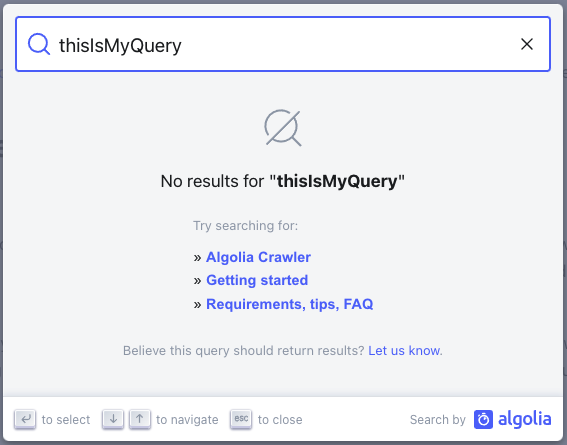
getMissingResultsUrl
type: ({ query: string }) => string| 可选
用于返回文档仓库 URL 的函数
- JavaScript
- React
docsearch({
  // ...
  getMissingResultsUrl({ query }) {
    return `https://github.com/algolia/docsearch/issues/new?title=${query}`;
  },
});
<DocSearch
  // ...
  getMissingResultsUrl={({ query }) => {
    return `https://github.com/algolia/docsearch/issues/new?title=${query}`;
  }}
/>
启用后,无结果搜索时会显示包含该链接的信息提示。默认文本可通过 translations 属性修改
resultsFooterComponent
type: ({ state }) => JSX.Element| 可选
显示在搜索结果底部的组件。
您可通过访问当前状态获取返回结果数量、查询内容等信息。
- JavaScript
- React
docsearch({
  // ...
  resultsFooterComponent({ state }) {
    return {
      // The HTML `tag`
      type: 'a',
      ref: undefined,
      constructor: undefined,
      key: state.query,
      // Its props
      props: {
        href: 'https://docsearch.algolia.com/apply',
        target: '_blank',
        onClick: (event) => {
          console.log(event);
        },
        // Raw text rendered in the HTML element
        children: `${state.context.nbHits} hits found!`,
      },
      __v: null,
    };
  },
});
<DocSearch
  // ...
  resultsFooterComponent={({ state }) => {
    return <h1>{state.context.nbHits} hits found</h1>;
  }}
/>
maxResultsPerGroup
type: number| 可选
每个搜索分组显示的最大结果数,默认值为 5。
- JavaScript
docsearch({
  // ...
  maxResultsPerGroup: 7,
});
theme
type: DocSearchTheme|default: "light"| 可选
DocSearch 主题模式,可选值为 light(浅色)或 dark(深色)。
- JavaScript
docsearch({
  // ...
  theme: 'light',
});