API 参考
本页面由 PageTurner AI 翻译(测试版)。未经项目官方认可。 发现错误? 报告问题 →
- JavaScript
- React
container
type: string | HTMLElement| required
The container for the DocSearch search box. You can either pass a CSS selector or an Element. If there are several containers matching the selector, DocSearch picks up the first one.
environment
type: typeof window|default: window| optional
The environment in which your application is running.
This is useful if you’re using DocSearch in a different context than window.
appId
type: string| 必填
您的 Algolia 应用 ID。
apiKey
type: string| 必填
您的 Algolia 搜索 API 密钥。
indices
type: Array<string | DocSearchIndex>
用于关键词搜索的索引列表及其_可选_的 searchParameters。
列表中的顺序至关重要,搜索结果将按照 indices 的顺序进行排序。
在
indexName处于弃用阶段期间,必须传递indices或indexName中的至少一个参数。未传递任一参数将导致抛出Error。
- JavaScript
- React
docsearch({
  // ...
  indices: ['YOUR_ALGOLIA_INDEX'],
  // ...
});
in case you want to use custom searchParameters for the index
docsearch({
  // ...
  indices: [
    {
      name: 'YOUR_ALGOLIA_INDEX',
      searchParameters: {
        facetFilters: ['language:en'],
        // ...
      },
    },
  ],
  // ...
});
<DocSearch
  // ...
  indices={['YOUR_ALGOLIA_INDEX']}
  // ...
/>
in case you want to use custom searchParameters for the index
<DocSearch
  // ...
  indices={[
    {
      name: 'YOUR_ALGOLIA_INDEX',
      searchParameters: {
        facetFilters: ['language:en'],
        // ...
      },
    },
  ]}
  // ...
/>
indexName
type: string| 已弃用
indexName 目前已被计划弃用,推荐使用的新属性是 indices。
您的 Algolia 索引名称。
在
indexName处于弃用阶段期间,必须传递indices或indexName中的至少一个参数。未传递任一参数将导致抛出Error。
placeholder
type: string|default: "Search docs"| 可选
The placeholder of the input of the DocSearch pop-up modal. Note: If you add a placeholder, it will replace the dynamic placeholder based on askAi. It would be better to edit translations instead.
askAi
type: AskAiObject|string| 可选
您的 Algolia Assistant ID。
- JavaScript
- React
docsearch({
  // ...
  askAi: 'YOUR_ALGOLIA_ASSISTANT_ID',
  // ...
});
or if you want to use different credentials for askAi and add search parameters
docsearch({
  // ...
  askAi: {
    indexName: 'ANOTHER_INDEX_NAME',
    apiKey: 'ANOTHER_SEARCH_API_KEY',
    appId: 'ANOTHER_APP_ID',
    assistantId: 'YOUR_ALGOLIA_ASSISTANT_ID',
    searchParameters: {
      // Filtering parameters
      facetFilters: ['language:en', 'version:latest'],
      filters: 'type:content AND language:en',

      // Content control parameters
      attributesToRetrieve: ['title', 'content', 'url'],
      restrictSearchableAttributes: ['title', 'content'],

      // Deduplication
      distinct: true,
    },

    // Enables/disables showing suggested questions on Ask AI's new conversation screen
    // NOTE: Only available with version >= 4.3
    suggestedQuestions: true,
  },
  // ...
});
<DocSearch
  // ...
  askAi="YOUR_ALGOLIA_ASSISTANT_ID"
/>
in case you want to use different credentials for askAi
<DocSearch
  // ...
  askAi={{
    indexName: 'ANOTHER_INDEX_NAME',
    apiKey: 'ANOTHER_SEARCH_API_KEY',
    appId: 'ANOTHER_APP_ID',
    assistantId: 'YOUR_ALGOLIA_ASSISTANT_ID',
    searchParameters: {
      // Filtering parameters
      facetFilters: ['language:en', 'version:latest'],
      filters: 'type:content AND language:en',

      // Content control parameters
      attributesToRetrieve: ['title', 'content', 'url'],
      restrictSearchableAttributes: ['title', 'content'],

      // Deduplication
      distinct: true,
    },

    // Enables/disables showing suggested questions on Ask AI's new conversation screen
    // NOTE: Only available with version >= 4.3
    suggestedQuestions: true,
  }}
/>
- 过滤:
facetFilters: ['type:content']- 按语言、版本或内容类型筛选 - 复杂过滤:
filters: 'type:content AND language:en'- 应用复杂过滤规则 - 内容控制:
attributesToRetrieve: ['title', 'content', 'url']- 控制返回的属性字段 - 搜索范围:
restrictSearchableAttributes: ['title', 'content']- 限定搜索特定字段 - 去重:
distinct: true- 移除重复结果 (boolean | number | string)
这些参数在保持 API 简洁聚焦的同时,提供了 Ask AI 的核心功能。
askAi.agentStudio
type: boolean| 可选 | 实验性
askAi.agentStudio 目前是实验性属性,预计在 5.0.0 版本中稳定发布。
若将 askAi.agentStudio 设为 true,Ask AI 聊天将使用 Algolia 的 Agent Studio 作为聊天后端而非 Ask AI 后端。详见 Algolia Agent Studio 文档。
docsearch({
  // ...
  askAi: {
    assistantId: 'YOUR_ALGOLIA_ASSISTANT_ID',
    agentStudio: true,
    searchParameters: {
      YOUR_INDEX_NAME: {
        filters: 'type:content AND language:en',
        attributesToRetrieve: ['title', 'content', 'url'],
        restrictSearchableAttributes: ['title', 'content'],
        distinct: 'url',
      },
    },
  },
});
- 标准 Ask AI(省略
agentStudio或设为false):searchParameters为扁平对象,支持facetFilters、filters、attributesToRetrieve、restrictSearchableAttributes和distinct - Agent Studio(
agentStudio: true):searchParameters需按索引名称键值对组织,支持filters、attributesToRetrieve、restrictSearchableAttributes和distinct
searchParameters
type: SearchParameters| 可选 | 已弃用
searchParameters 目前已被计划弃用,推荐使用的新属性是 indices。
transformItems
type: function|default: items => items| 可选
接收来自搜索响应的条目,并在显示前进行处理。应返回与原始数组结构相同的新数组,适用于对条目进行转换、删除或重新排序。
- JavaScript
- React
docsearch({
  // ...
  transformItems(items) {
    return items.map((item) => ({
      ...item,
      content: item.content.toUpperCase(),
    }));
  },
});
<DocSearch
  // ...
  transformItems={(items) => {
    return items.map((item) => ({
      ...item,
      content: item.content.toUpperCase(),
    }));
  }}
/>
hitComponent
type: ({ hit, children }, { html }) => JSX.Element | string | Function|default: Hit| 可选
用于展示每个条目的组件。支持以下模板模式:
-
使用 html 辅助函数的 HTML 字符串(JS CDN 推荐):
({ hit, children }, { html }) => html... -
JSX 模板(适用于 React/Preact):
({ hit, children }) => <div>...</div> -
基于函数的模板:
(props) => string | JSX.Element | Function
可通过 hit 对象访问搜索结果的全部数据,children 则是默认渲染内容。
参阅默认实现。
- JavaScript
- React
docsearch({
  // ...
  hitComponent({ hit, children }, { html }) {
    // Using HTML strings with html helper
    return html`
      <a href="${hit.url}" class="custom-hit-class">
        <div class="hit-icon">🔍</div>
        <div class="hit-content">${children}</div>
      </a>
    `;
  },
});
<DocSearch
  // ...
  hitComponent={({ hit, children }) => {
    // Using JSX templates
    return (
      <a href={hit.url} className="custom-hit-class">
        <div className="hit-icon">🔍</div>
        <div className="hit-content">{children}</div>
      </a>
    );
  }}
/>
transformSearchClient
type: function|default: DocSearchTransformClient => DocSearchTransformClient| 可选
用于转换 Algolia 搜索客户端,例如实现 搜索查询防抖
disableUserPersonalization
type: boolean|default: false| 可选
禁用将最近搜索和收藏保存到本地存储的功能
initialQuery
type: string| 可选
搜索输入框的初始查询内容
navigator
type: Navigator| 可选
Algolia Autocomplete 导航器 API 的实现,用于在打开链接时重定向用户
详见 导航器 API 文档
translations
type: Partial<DocSearchTranslations>|default: docSearchTranslations| 可选
允许翻译 DocSearch 按钮或弹窗组件中的任意原始文本和 aria 标签
docSearchTranslations
const translations: DocSearchTranslations = {
  button: {
    buttonText: 'Search',
    buttonAriaLabel: 'Search',
  },
  modal: {
    searchBox: {
      clearButtonTitle: 'Clear',
      clearButtonAriaLabel: 'Clear the query',
      closeButtonText: 'Close',
      closeButtonAriaLabel: 'Close',
      placeholderText: undefined, // fallback: 'Search docs' or 'Search docs or ask AI a question'
      placeholderTextAskAi: undefined, // fallback: 'Ask another question...'
      placeholderTextAskAiStreaming: 'Answering...',
      // can only be one of the following
      // https://developer.mozilla.org/en-US/docs/Web/HTML/Reference/Global_attributes/enterkeyhint#value
      enterKeyHint: 'search',
      enterKeyHintAskAi: 'enter',
      searchInputLabel: 'Search',
      backToKeywordSearchButtonText: 'Back to keyword search',
      backToKeywordSearchButtonAriaLabel: 'Back to keyword search',
      newConversationPlaceholder: 'Ask a question',
      conversationHistoryTitle: 'My conversation history',
      startNewConversationText: 'Start a new conversation',
      viewConversationHistoryText: 'Conversation history'
    },
    startScreen: {
      recentSearchesTitle: 'Recent',
      noRecentSearchesText: 'No recent searches',
      saveRecentSearchButtonTitle: 'Save this search',
      removeRecentSearchButtonTitle: 'Remove this search from history',
      favoriteSearchesTitle: 'Favorite',
      removeFavoriteSearchButtonTitle: 'Remove this search from favorites',
      recentConversationsTitle: 'Recent conversations',
      removeRecentConversationButtonTitle:
        'Remove this conversation from history',
    },
    errorScreen: {
      titleText: 'Unable to fetch results',
      helpText: 'You might want to check your network connection.',
    },
    noResultsScreen: {
      noResultsText: 'No results found for',
      suggestedQueryText: 'Try searching for',
      reportMissingResultsText: 'Believe this query should return results?',
      reportMissingResultsLinkText: 'Let us know.',
    },
    resultsScreen: {
      askAiPlaceholder: 'Ask AI: ',
      noResultsAskAiPlaceholder: 'Didn't find it in the docs? Ask AI to help: ',
    },
    askAiScreen: {
      disclaimerText:
        'Answers are generated with AI which can make mistakes. Verify responses.',
      relatedSourcesText: 'Related sources',
      thinkingText: 'Thinking...',
      copyButtonText: 'Copy',
      copyButtonCopiedText: 'Copied!',
      copyButtonTitle: 'Copy',
      likeButtonTitle: 'Like',
      dislikeButtonTitle: 'Dislike',
      thanksForFeedbackText: 'Thanks for your feedback!',
      preToolCallText: 'Searching...',
      duringToolCallText: 'Searching for ',
      afterToolCallText: 'Searched for',
      // If provided, these override the default rendering of aggregated tool calls:
      aggregatedToolCallNode: undefined, // (queries: string[], onSearchQueryClick: (query: string) => void) => React.ReactNode
      aggregatedToolCallText: undefined, // (queries: string[]) => { before?: string; separator?: string; lastSeparator?: string; after?: string }
      // Text to show when user has stopped streaming a message
      stoppedStreamingText: 'You stopped this response',
    },
    footer: {
      selectText: 'Select',
      submitQuestionText: 'Submit question',
      selectKeyAriaLabel: 'Enter key',
      navigateText: 'Navigate',
      navigateUpKeyAriaLabel: 'Arrow up',
      navigateDownKeyAriaLabel: 'Arrow down',
      closeText: 'Close',
      backToSearchText: 'Back to search',
      closeKeyAriaLabel: 'Escape key',
      poweredByText: 'Powered by',
    },
    newConversation: {
      newConversationTitle: 'How can I help you today?',
      newConversationDescription: 'I search through your documentation to help you find setup guides, feature details and troubleshooting tips, fast.'
    }
  },
};
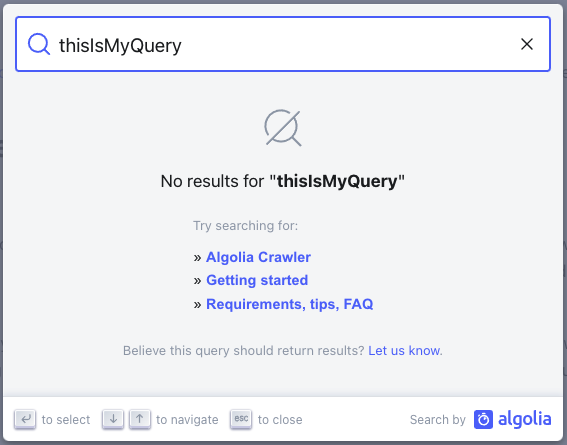
getMissingResultsUrl
type: ({ query: string }) => string| 可选
用于返回文档仓库 URL 的函数
- JavaScript
- React
docsearch({
  // ...
  getMissingResultsUrl({ query }) {
    return `https://github.com/algolia/docsearch/issues/new?title=${query}`;
  },
});
<DocSearch
  // ...
  getMissingResultsUrl={({ query }) => {
    return `https://github.com/algolia/docsearch/issues/new?title=${query}`;
  }}
/>
启用后,无结果搜索时会显示包含该链接的信息提示。默认文本可通过 translations 属性修改
keyboardShortcuts
type: KeyboardShortcuts| 可选
触发搜索弹窗的键盘快捷键配置
默认行为:
-
Ctrl/Cmd+K- 打开/关闭搜索弹窗 -
/- 打开搜索弹窗(不关闭)
接口定义:
interface KeyboardShortcuts {
  'Ctrl/Cmd+K'?: boolean; // default: true
  '/'?: boolean; // default: true
}
- JavaScript
- React
// Default - all shortcuts enabled
docsearch({
  // ...
});

// Disable slash shortcut
docsearch({
  // ...
  keyboardShortcuts: { '/': false },
});

// Disable Ctrl/Cmd+K shortcut (also hides button hint)
docsearch({
  // ...
  keyboardShortcuts: { 'Ctrl/Cmd+K': false },
});

// Disable all keyboard shortcuts
docsearch({
  // ...
  keyboardShortcuts: { 'Ctrl/Cmd+K': false, '/': false },
});
{
  /* Default - all shortcuts enabled */
}
<DocSearch
// ...
/>;

{
  /* Disable slash shortcut */
}
<DocSearch
  // ...
  keyboardShortcuts={{ '/': false }}
/>;

{
  /* Disable Ctrl/Cmd+K shortcut (also hides button hint) */
}
<DocSearch
  // ...
  keyboardShortcuts={{ 'Ctrl/Cmd+K': false }}
/>;

{
  /* Disable all keyboard shortcuts */
}
<DocSearch
  // ...
  keyboardShortcuts={{ 'Ctrl/Cmd+K': false, '/': false }}
/>;
- Ctrl/Cmd+K:切换快捷键,可同时打开/关闭弹窗
- /:字符快捷键,仅打开弹窗(避免干扰搜索输入)
- Esc:无论配置如何,始终可关闭弹窗
resultsFooterComponent
type: ({ state }, { html }) => JSX.Element | string | Function| 可选
用于在搜索结果下方展示的组件。支持以下模板模式:
-
使用 html 辅助函数的 HTML 字符串(JS CDN 推荐):
({ state }, { html }) => html... -
JSX 模板(适用于 React/Preact):
({ state }) => <div>...</div> -
基于函数的模板:
(props) => string | JSX.Element | Function
您可通过访问当前状态获取返回结果数量、查询内容等信息。
- JavaScript
- React
docsearch({
  // ...
  resultsFooterComponent({ state }, { html }) {
    // Using HTML strings with html helper
    return html`
      <div class="DocSearch-HitsFooter">
        <a href="https://docsearch.algolia.com/apply" target="_blank">
          See all ${state.context.nbHits} results
        </a>
      </div>
    `;
  },
});
<DocSearch
  // ...
  resultsFooterComponent={({ state }) => {
    // Using JSX templates
    return (
      <div className="DocSearch-HitsFooter">
        <a href="https://docsearch.algolia.com/apply" target="_blank">
          See all {state.context.nbHits} results
        </a>
      </div>
    );
  }}
/>
maxResultsPerGroup
type: number| 可选
每个搜索分组显示的最大结果数,默认值为 5。
- JavaScript
docsearch({
  // ...
  maxResultsPerGroup: 7,
});
recentSearchesLimit
type: number|default: 7| 可选
The maximum number of recent searches that are stored for the user. Default is 7. 为用户存储的最近搜索记录最大数量,默认值为 7。
- JavaScript
- React
docsearch({
  // ...
  recentSearchesLimit: 12,
  // ...
});
<DocSearch
  // ...
  recentSearchesLimit={12}
  // ...
/>
recentSearchesWithFavoritesLimit
type: number|default: 4| 可选
The maximum number of recent searches that are stored when the user has favorited searches. Default is 4. 当用户存在收藏搜索时,存储的最近搜索记录最大数量,默认值为 4。
- JavaScript
- React
docsearch({
  // ...
  recentSearchesWithFavoritesLimit: 5,
  // ...
});
<DocSearch
  // ...
  recentSearchesWithFavoritesLimit={5}
  // ...
/>
portalContainer (仅限 React)
type: Element | DocumentFragment|default: document.body| 可选
DocSearch 弹窗的挂载容器节点。当需要在自定义 DOM 节点(如 shadow root、特定布局容器或弹窗管理器)中渲染时使用。未指定时默认挂载到 document.body。
此属性仅存在于 @docsearch/react 中。若使用 @docsearch/js,请改用 container 选项——该值同时作为搜索按钮的挂载点和弹窗的挂载目标。
- React
- JavaScript
// assume you have a dedicated modal root in your html
<div id="modal-root" />;

const portalEl = document.getElementById('modal-root');

<DocSearch
  appId="YOUR_APP_ID"
  apiKey="YOUR_SEARCH_API_KEY"
  indexName="YOUR_INDEX_NAME"
  // render the modal inside #modal-root instead of document.body
  portalContainer={portalEl}
/>;
docsearch({
  // the element that will **contain the button** and **host the modal portal**
  container: '#modal-root',
  appId: 'YOUR_APP_ID',
  apiKey: 'YOUR_SEARCH_API_KEY',
  indexName: 'YOUR_INDEX_NAME',
});