必須設定
このページは PageTurner AI で翻訳されました(ベータ版)。プロジェクト公式の承認はありません。 エラーを見つけましたか? 問題を報告 →
This section gives you the best practices to optimize our crawl. Adopting the following specification is required to let our crawler build the best experience from your website. You will need to update your website and follow these rules.
対応ツールのいずれかで生成されたウェブサイトの場合、既に要件を満たしているため変更は不要です。
汎用設定の例
デフォルトのDocSearch設定テンプレートを以下に示します。complex extractors セクションの例を参考にカスタマイズ可能です。
統合ツールを使用している場合は、テンプレートページを参照してください。
docsearch-default.js
new Crawler({
  appId: 'YOUR_APP_ID',
  apiKey: 'YOUR_API_KEY',
  startUrls: ['https://YOUR_START_URL.io/'],
  sitemaps: ['https://YOUR_START_URL.io/sitemap.xml'],
  actions: [
    {
      indexName: 'YOUR_INDEX_NAME',
      pathsToMatch: ['https://YOUR_START_URL.io/**'],
      recordExtractor: ({ helpers }) => {
        return helpers.docsearch({
          recordProps: {
            lvl0: {
              selectors: '',
              defaultValue: 'Documentation',
            },
            lvl1: ['header h1', 'article h1', 'main h1', 'h1', 'head > title'],
            lvl2: ['article h2', 'main h2', 'h2'],
            lvl3: ['article h3', 'main h3', 'h3'],
            lvl4: ['article h4', 'main h4', 'h4'],
            lvl5: ['article h5', 'main h5', 'h5'],
            lvl6: ['article h6', 'main h6', 'h6'],
            content: ['article p, article li', 'main p, main li', 'p, li'],
          },
          aggregateContent: true,
          recordVersion: 'v3',
        });
      },
    },
  ],
  initialIndexSettings: {
    YOUR_INDEX_NAME: {
      attributesForFaceting: ['type', 'lang'],
      attributesToRetrieve: [
        'hierarchy',
        'content',
        'anchor',
        'url',
        'url_without_anchor',
        'type',
      ],
      attributesToHighlight: ['hierarchy', 'content'],
      attributesToSnippet: ['content:10'],
      camelCaseAttributes: ['hierarchy', 'content'],
      searchableAttributes: [
        'unordered(hierarchy.lvl0)',
        'unordered(hierarchy.lvl1)',
        'unordered(hierarchy.lvl2)',
        'unordered(hierarchy.lvl3)',
        'unordered(hierarchy.lvl4)',
        'unordered(hierarchy.lvl5)',
        'unordered(hierarchy.lvl6)',
        'content',
      ],
      distinct: true,
      attributeForDistinct: 'url',
      customRanking: [
        'desc(weight.pageRank)',
        'desc(weight.level)',
        'asc(weight.position)',
      ],
      ranking: [
        'words',
        'filters',
        'typo',
        'attribute',
        'proximity',
        'exact',
        'custom',
      ],
      highlightPreTag: '<span class="algolia-docsearch-suggestion--highlight">',
      highlightPostTag: '</span>',
      minWordSizefor1Typo: 3,
      minWordSizefor2Typos: 7,
      allowTyposOnNumericTokens: false,
      minProximity: 1,
      ignorePlurals: true,
      advancedSyntax: true,
      attributeCriteriaComputedByMinProximity: true,
      removeWordsIfNoResults: 'allOptional',
      separatorsToIndex: '_',
    },
  },
});
明確なレイアウトの概要
A website implementing these best practices will look simple and clear, as shown below:
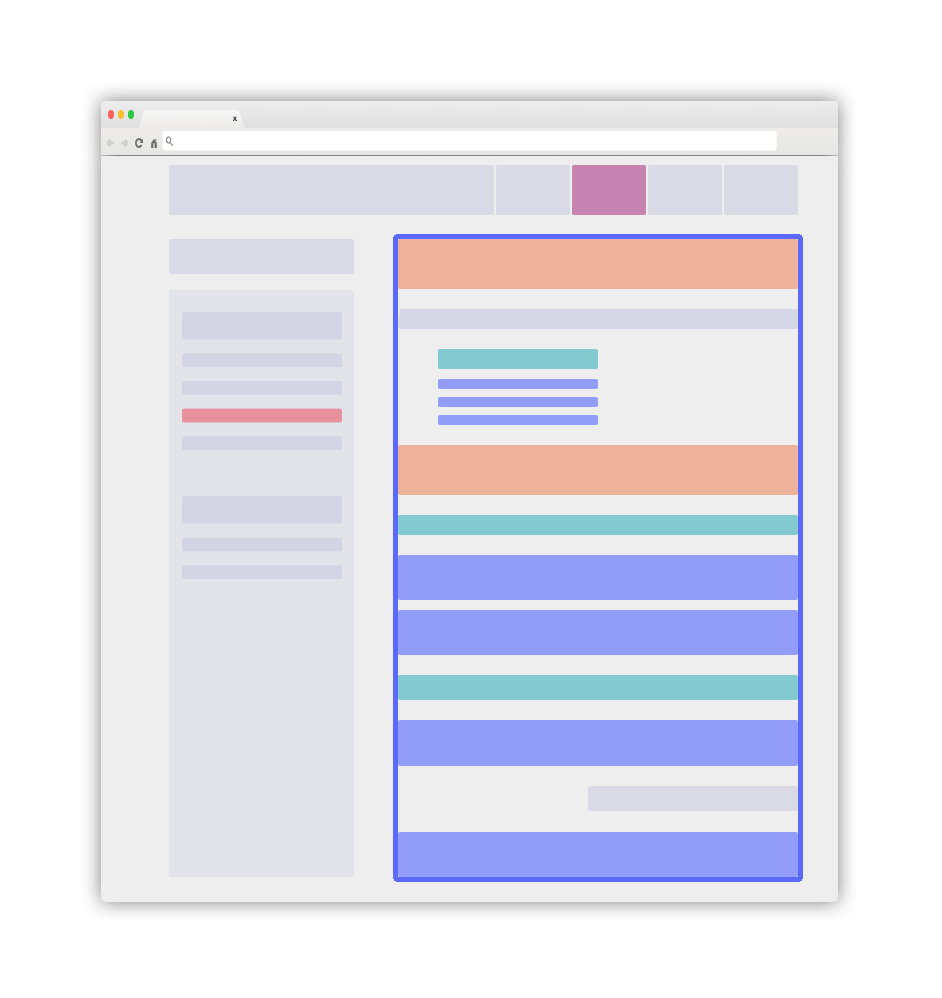
青色のメイン要素が.DocSearch-contentコンテナになります。詳細は後続のガイドラインで説明します。
recordPropsとして適切なクラスを使用
コンテンツの役割を特定するため、スタイル変更を含まない静的クラスを追加できます。これらの専用クラスにより、ドキュメントから「入力しながら学べる」優れた検索体験を構築できます。
-
テキストコンテンツのメインコンテナに静的クラス
DocSearch-contentを追加(通常は<main>または<article>HTML要素) -
メインドキュメントコンテナ外の検索可能な
lvl要素(サイドバーなど)はglobalセレクタにする必要があります。これらはグローバルに収集され、ページから生成される全レコードに注入されます。レベル値は重要であり、HTMLフローに沿って増加する必要がある点に注意してください。レベルX(lvlX)はX > YとなるレベルYの後に出現する必要があります。 -
lvlXセレクタは標準見出しタグ(h1,h2,h3など)か静的クラスを使用します。後述するように、これらの要素には一意のidまたはname属性を設定してください。 -
lvlXセレクタに一致する全DOM要素は一意なidまたはname属性を持つ必要があります。これによりリダイレクト時に正確な位置までスクロールできます。これらの属性が使用するアンカーを定義します。 -
テキスト要素(recordPropsの
content)は<p>または<li>タグでラップしてください。コンテンツは原子的で小さな単位に分割する必要があります。一致要素をネストすると重複が発生するため注意してください。 -
一貫性を保ち、HTMLフローに沿った整合性が必要なことを忘れないでください。
メタタグによるグローバル情報の追加
当社クローラーはDocSearch専用メタタグから情報を自動抽出します:
<meta name="docsearch:language" content="en" />
<meta name="docsearch:version" content="1.0.0" />
クロールはこれらのmetaタグのcontent値を、ページから抽出された全レコードに追加します。メタタグのnameはdocsearch:$NAMEパターンに従う必要があります。$NAMEは全レコードに設定される属性名です。
docsearch:versionメタタグはカンマ区切りトークンのセットにでき、各トークンはページに関連するバージョンです。これらのトークンはSemVer仕様に準拠するか、英数字のみを含む必要があります(例:latest, next)。ファセットフィルターとして、これらのバージョントークンは大文字小文字を区別しません。
例えば、以下のメタタグがあるページから抽出された全レコード:
<meta name="docsearch:version" content="2.0.0-alpha.62,latest" />
これらのレコードのversion属性は次のようになります:
version:["2.0.0-alpha.62", "latest"]
その後、これらの属性をfacetFiltersに変換してUIからフィルタリングできます。
あると便利な設定
-
ウェブサイトには更新されたサイトマップが必要です。これはクローラーに更新対象を認識させる重要な要素です。ご安心ください、埋め込みハイパーリンクを通じて優れたコンテンツを発見するため、引き続きサイトをクロールします。
-
すべてのページには完全なコンテキストが含まれている必要があります。グローバル要素の活用が有効です(上記参照)。
-
ドキュメントコンテンツがクライアントサイドのJavaScriptレンダリングなしでも利用可能であることを確認してください。JavaScriptが必須の場合は、設定で
renderJavaScript: trueを設定する必要があります。